



All playbooks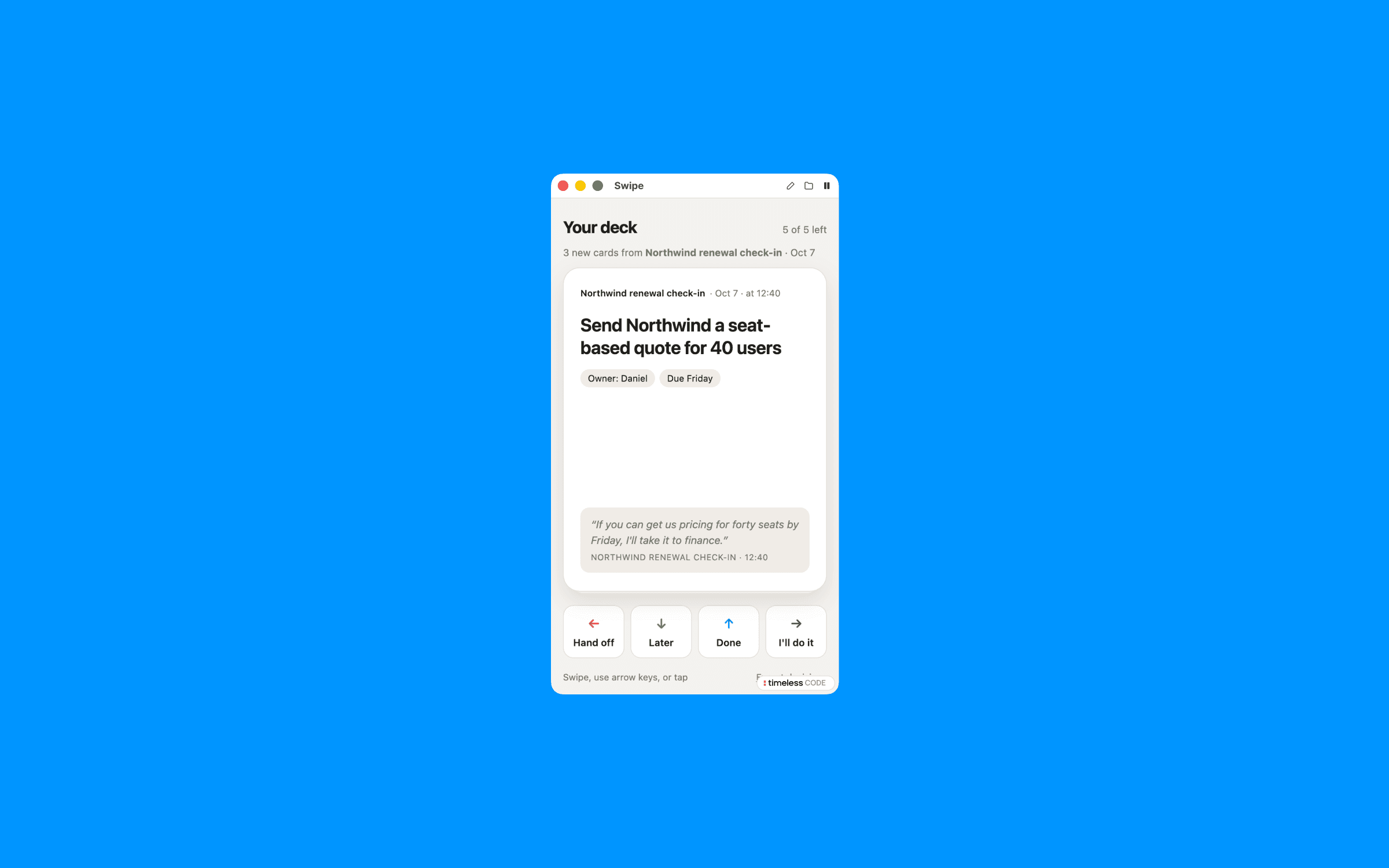
Swipe
Tinder for action items from meetings
The prompt
Set up the Swipe playbook from Timeless for me. After every meeting, its action items land in a deck of cards I swipe through: right means I'll do it, left means I hand it off, up means done, and down means later. Work through these steps in order.

1. Check Timeless first
Run `timeless version --json`. If `timeless` is not on your PATH, try /Applications/Timeless.app/Contents/Resources/timeless-cli/timeless (or the same path under ~/Applications). Then run `timeless status --json`.
- If both work and status shows "authenticated": true, tell me in one line that Timeless is already installed and connected, then go straight to step 2. Do not run the onboarding again.
- Otherwise: Set up Timeless for me. Fetch https://docs.timeless.day/cli/agent-install.md and follow those instructions exactly. When setup is done, continue with step 2.

2. Ask me first
Ask everything in one short message, suggest a default for each, and wait for my answers. If this message already answers something, don't ask it again.
- Which meetings feed the deck: all of them, or only meetings I host? Are there recurring meetings to skip, like a daily standup?
- Whose action items: only mine, or everyone's, with an owner on each card?
- What is my name as it appears in meetings? Offer what you see in my recent meetings as the default.
- When I swipe left to hand something off, what should I get: a ready-to-send message to the owner, or a prompt for my AI agent?
- How long should "later" snooze a card? (default until tomorrow morning)

3. Build it
Create an event-driven playbook named swipe (on.event: meeting.transcript_ready). Its prompt should:
- Read the meeting (`timeless meetings get {{.MeetingID}}` and `timeless meetings transcript {{.MeetingID}}`). If the meeting id is empty or the transcript can't be read, write nothing and print why.
- Extract action items. For each one: what exactly, the owner, a due date only if one was said, the meeting title and date, the time in the meeting it came up, and a short supporting quote. Never turn a vague idea into a task. For a meeting I asked to skip, add no cards.
- Keep one running deck across meetings in ~/.local/share/timeless/swipe/state.json. Re-read the file right before writing it, write it atomically (to a temp file, then a rename), drop duplicates, and never change a decision I already made on a card.
- Write the whole deck to {{.OutPath}} after every meeting it reads, even when that meeting added nothing new or was skipped (then say so on top), because an empty run would show up as a failed playbook. The deck shows one card at a time: swipe or arrow keys, with buttons as a fallback. Every card shows which meeting and moment it came from, plus a counter of what's left. Choices persist in localStorage (inside try/catch) and the page offers an export of my decisions.
- Design: big, friendly cards, readable on a phone, with light and dark mode.
Read the timeless skill that came with Timeless, especially its guide to customizing playbooks, before you edit anything. Add the playbook to ~/.config/timeless/config.yaml and leave every existing playbook exactly as it is. Its prompt must follow the Timeless success contract: write one complete, self-contained HTML file to {{.OutPath}} with all CSS, JS, fonts and images inlined (the file opens offline, so nothing may load from the network). If the data it needs is missing, it writes nothing and prints why. A file is delivered to me as a finished result, so never write a placeholder or an error page. The playbook must never open, preview or play anything on my computer while it runs.
Then run `timeless playbooks validate swipe` and fix anything it reports.

4. Show me a dry run
Run it on my most recent meeting without using up any queued meeting: get the newest id with `timeless meetings list --status completed --limit 1 --json`, follow the playbook's own instructions for that meeting by hand, write the result to a preview file outside ~/.local/share/timeless/artifacts, and show it to me. Never use `timeless playbooks run --event-type` for this, because that consumes real meetings. If I have no recorded meetings yet, skip this and tell me it will run after my next one.
Finish with two lines: what you built and when it runs, and how to pause it (`timeless playbooks disable swipe`).