

כל ה-playbooks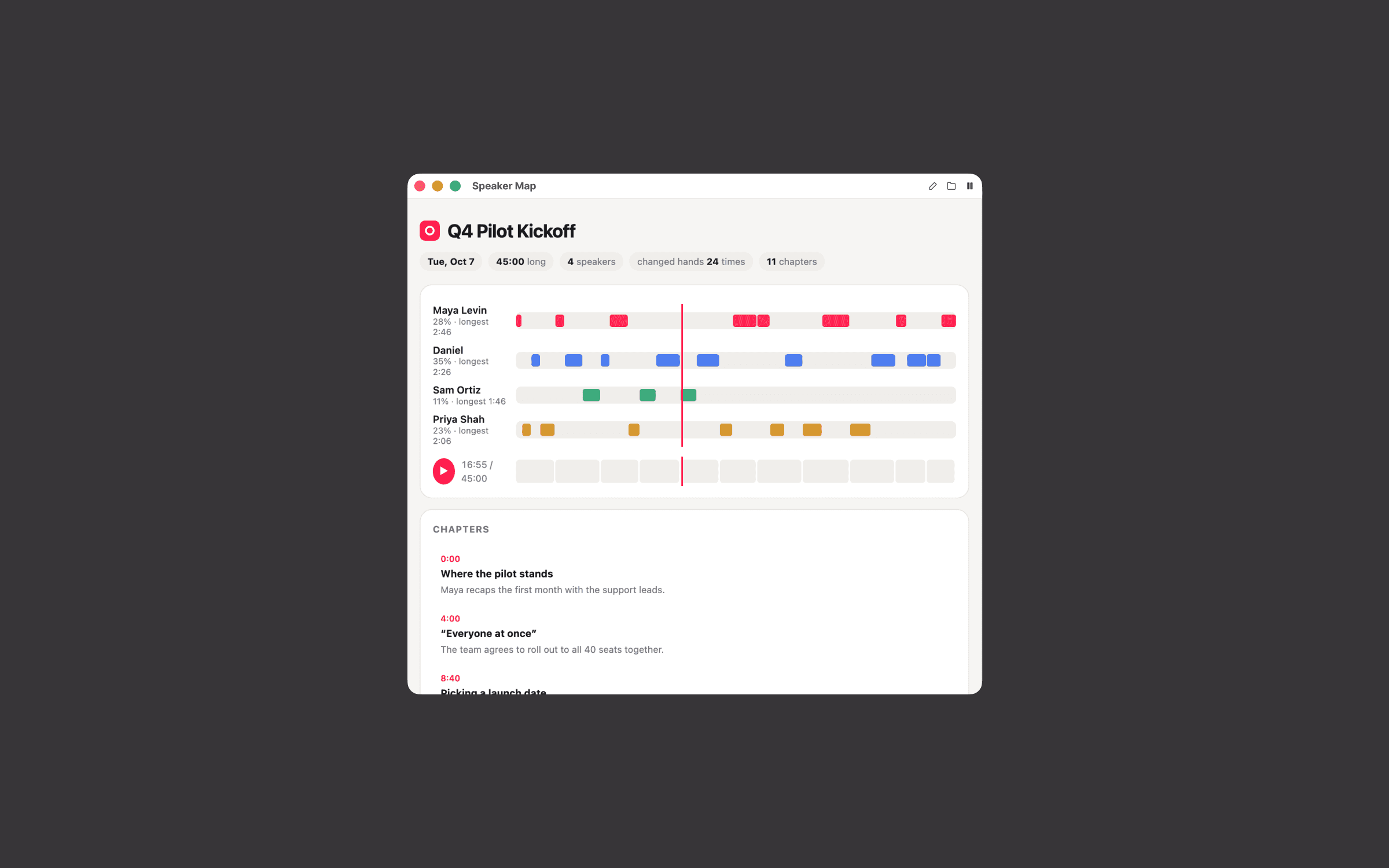
מפת דוברים
מי דיבר מתי, פרק אחרי פרק. מוצאים כל רגע בשניות.
ה-prompt
Set up the Speaker Map playbook from Timeless for me. After every meeting, I get an interactive map of the conversation: who spoke when, chapters at every topic change, and a searchable transcript, so I can jump to any moment in seconds. Work through these steps in order.

1. Check Timeless first
Run `timeless version --json`. If `timeless` is not on your PATH, try /Applications/Timeless.app/Contents/Resources/timeless-cli/timeless (or the same path under ~/Applications). Then run `timeless status --json`.
- If both work and status shows "authenticated": true, tell me in one line that Timeless is already installed and connected, then go straight to step 2. Do not run the onboarding again.
- Otherwise: Set up Timeless for me. Fetch https://docs.timeless.day/cli/agent-install.md and follow those instructions exactly. When setup is done, continue with step 2.

2. Ask me first
Ask everything in one short message, suggest a default for each, and wait for my answers. If this message already answers something, don't ask it again.
- Should the map include the recording, so I can play any moment? Files get bigger (around 10 to 30 MB per meeting). Without it, the map is a timeline and transcript only.
- Do I want my company logo on it? I can drag in a PNG or SVG file, give a path, or share my website so you can pull the logo from it. Default is the Timeless logo.
- Accent color for the speaker lanes and highlights? (default from my logo, or Timeless red #FF0044)
- Language for headings: English, or the language each meeting was held in?

3. Build it
If I want playback, check for ffmpeg and ffprobe (try /opt/homebrew/bin too). If they're missing, ask me before installing anything, or fall back to audio only. Save my logo once under ~/.config/timeless/brand/. Then create an event-driven playbook named speaker_map (on.event: meeting.transcript_ready). Its prompt should:
- Read `timeless meetings get {{.MeetingID}}` and `timeless meetings transcript {{.MeetingID}}` (segments with speaker_id, start_time and end_time in seconds, and text). If the transcript fails or has no segments, write nothing and print why.
- If playback is on, download the recording from `timeless meetings recording {{.MeetingID}}` (a short-lived link), shrink it with ffmpeg and embed it as a data URI. Above about 35 MB, skip playback and say so on the page. Never reference the remote link, and delete temp files afterwards.
- Cut the meeting into 8 to 20 chapters at real topic changes, each with a start time, a short title in the speakers' own words, and one summary sentence.
- The page includes a header with the date, duration, speaker count and how often the conversation changed hands. Then one lane per speaker, showing their turns, talk-time share and longest unbroken stretch. Then a scrub bar split into chapters with a hover preview of the chapter, a chapter list, and the transcript with search, where the current line follows playback. Clicking anything seeks there. Keyboard: space plays, arrows jump 10 seconds. Handle right-to-left languages per line.
- Playback starts only when I click. No autoplay, ever.
Read the timeless skill that came with Timeless, especially its guide to customizing playbooks, before you edit anything. Add the playbook to ~/.config/timeless/config.yaml and leave every existing playbook exactly as it is. Its prompt must follow the Timeless success contract: write one complete, self-contained HTML file to {{.OutPath}} with all CSS, JS, fonts and images inlined (the file opens offline, so nothing may load from the network). If the data it needs is missing, it writes nothing and prints why. A file is delivered to me as a finished result, so never write a placeholder or an error page. The playbook must never open, preview or play anything on my computer while it runs.
Then run `timeless playbooks validate speaker_map` and fix anything it reports.

4. Show me a dry run
Run it on my most recent meeting without using up any queued meeting: get the newest id with `timeless meetings list --status completed --limit 1 --json`, follow the playbook's own instructions for that meeting by hand, write the result to a preview file outside ~/.local/share/timeless/artifacts, and show it to me. Never use `timeless playbooks run --event-type` for this, because that consumes real meetings. If I have no recorded meetings yet, skip this and tell me it will run after my next one.
Finish with two lines: what you built and when it runs, and how to pause it (`timeless playbooks disable speaker_map`).